

Overview
This guide covers installation, settings tabs, storefront behaviour, and troubleshooting for Carbon Based Studio AJAX Add to Cart.
Settings are at Carbon Based > AJAX Add to Cart.
WooCommerce’s Enable AJAX add to cart buttons on archives setting only affects shop loops, not single product pages. This plugin adds AJAX add-to-cart on product pages, returns notice HTML in the AJAX response, and supports custom purchase forms when your theme markup differs from standard WooCommerce.
AJAX Add to Cart is a free plugin on WordPress.org. No license key is required.
Installation
- Install from Plugins > Add New on WordPress.org or upload to
wp-content/plugins/. - Activate Carbon Based Studio AJAX Add to Cart (requires WooCommerce 8.2+).
- Confirm Carbon Based appears in the admin menu with AJAX Add to Cart as a submenu.
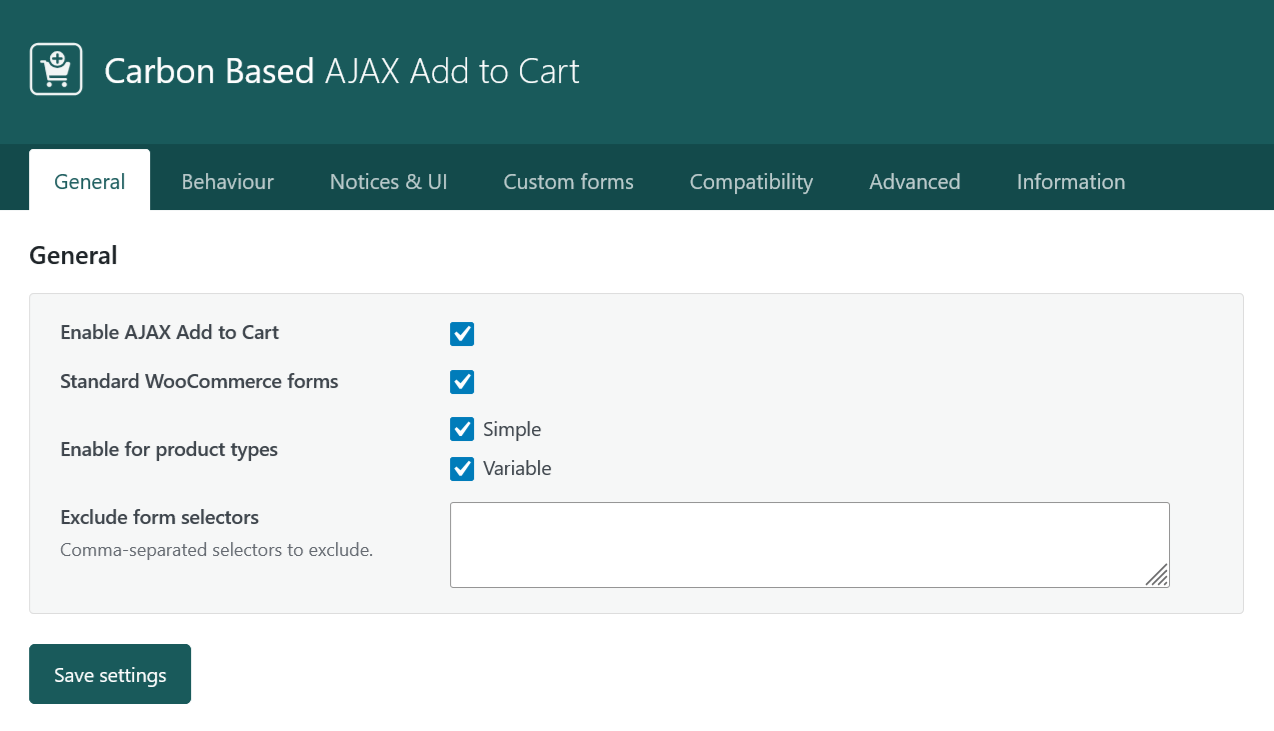
- Open General, enable Enable AJAX Add to Cart, and click Save settings.
Requirements: WordPress 6.0+, PHP 7.4+, and WooCommerce 8.2+. Tested with WooCommerce 10.x.
Settings overview
| Tab | Purpose |
|---|---|
| General | Master toggle, Standard WooCommerce forms profile, product types, exclude form selectors. |
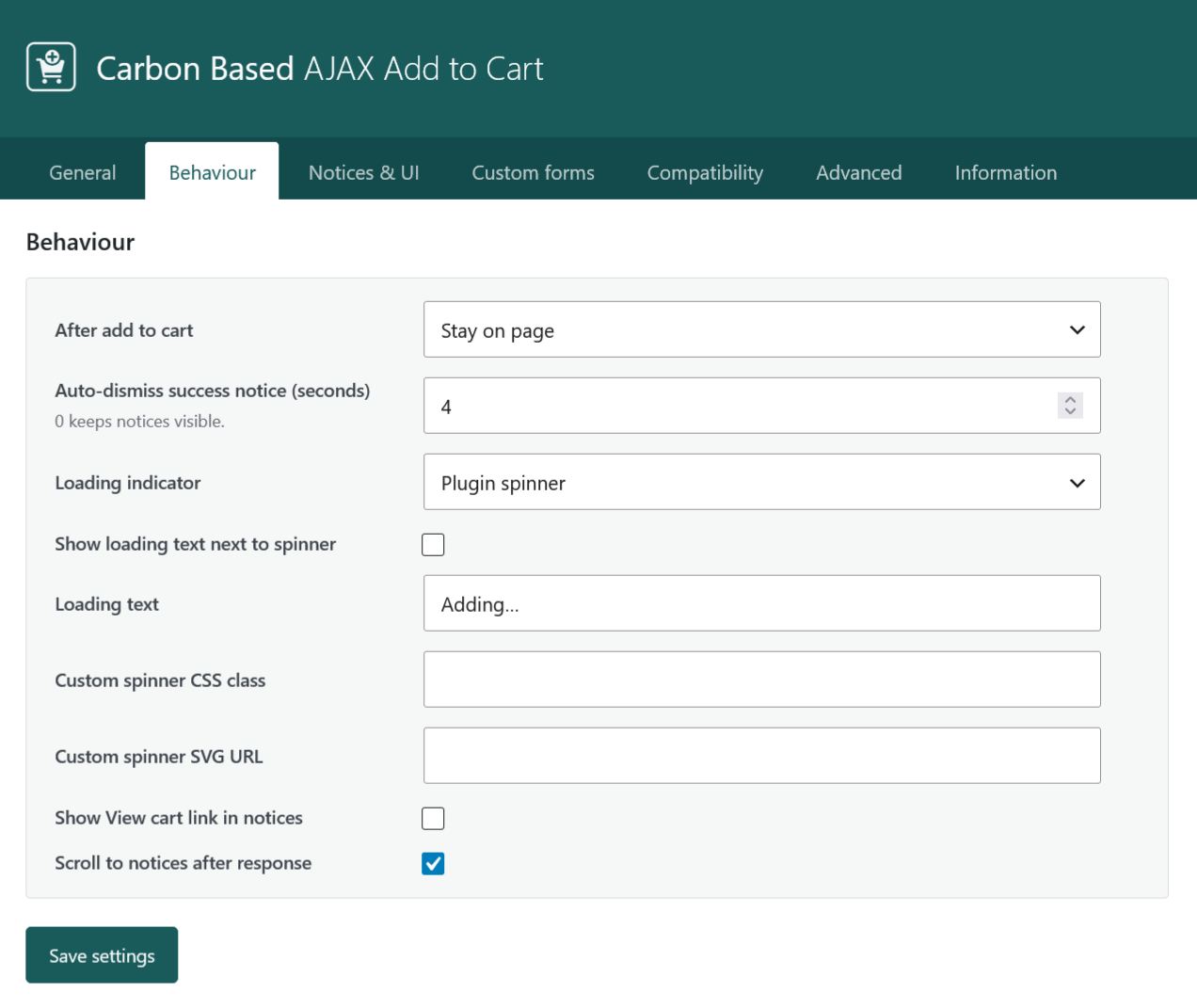
| Behavior | Post-add action (stay, cart, checkout), loading indicator, success notice auto-dismiss, View cart link, scroll to notices. |
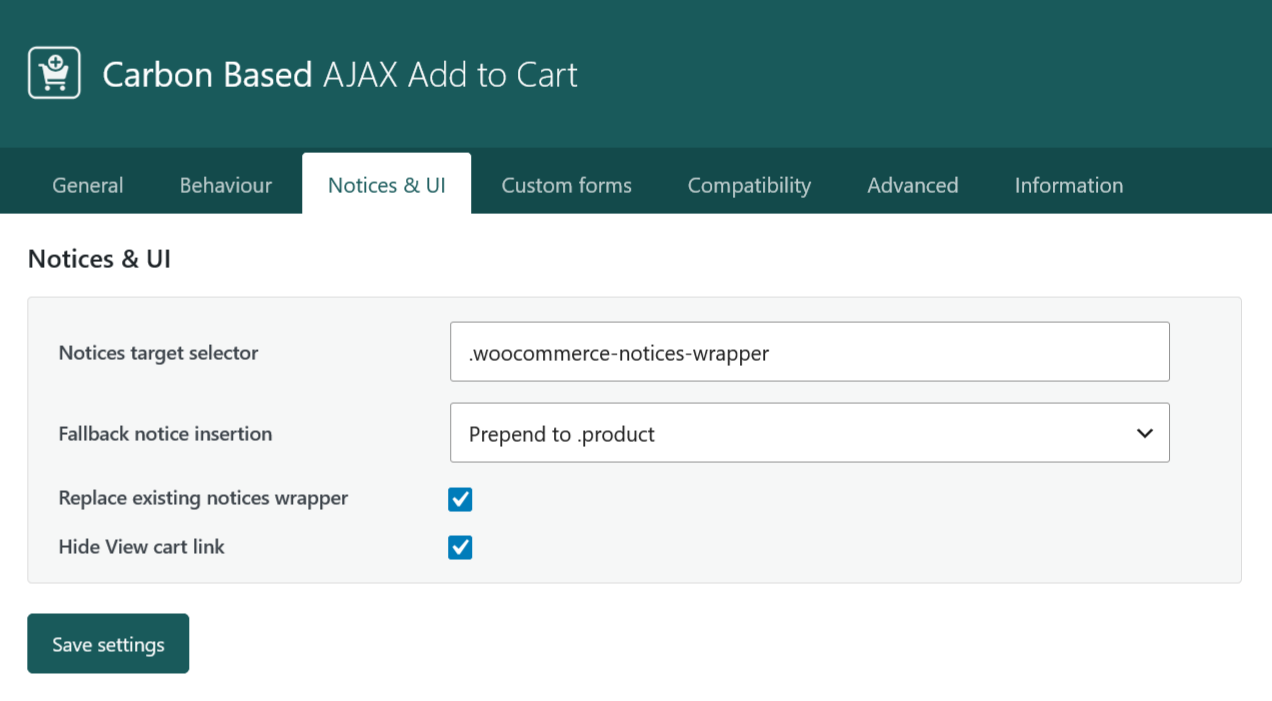
| Notices & UI | Notice target selector, fallback insertion, replace wrapper, hide under-button View cart link. |
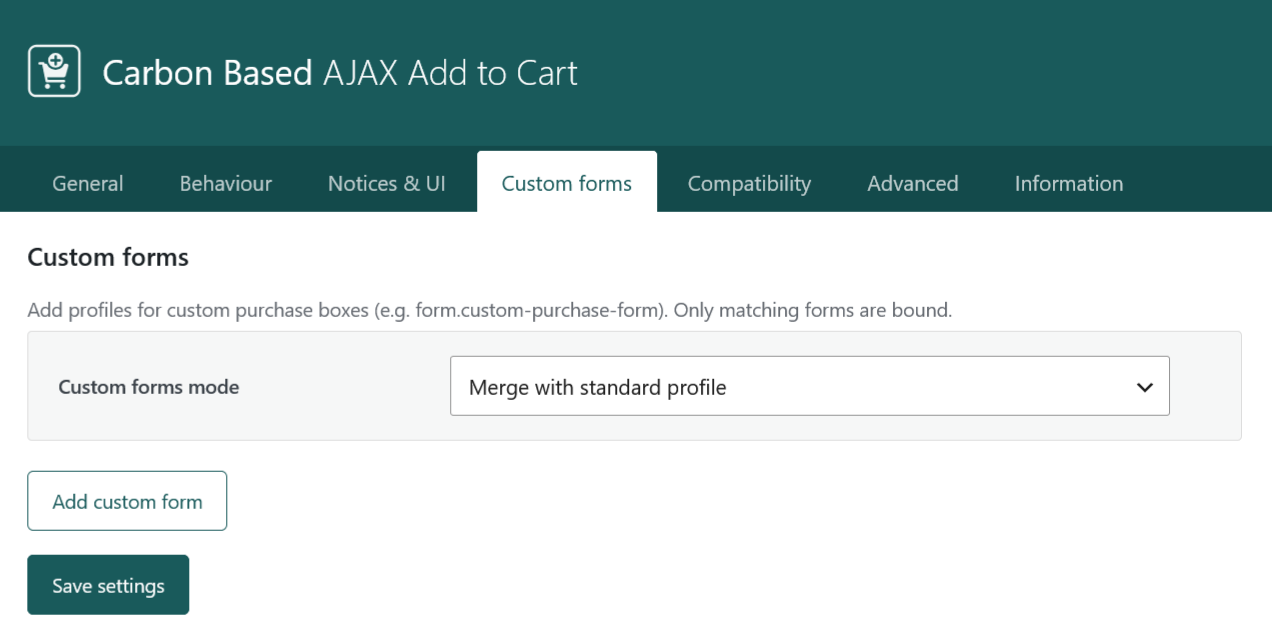
| Custom forms | Custom form profiles (selectors, field mapping), merge vs custom-only mode. |
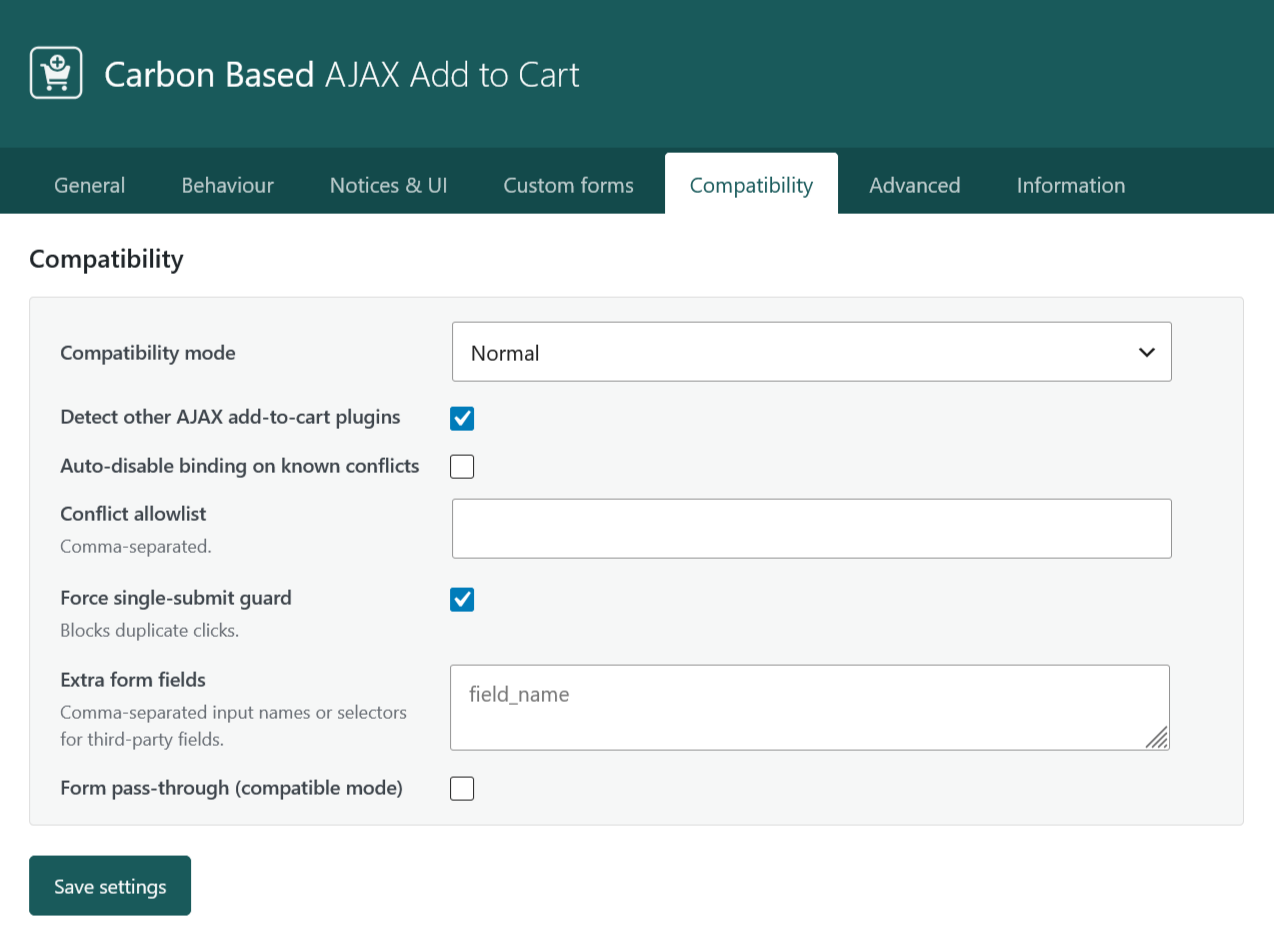
| Compatibility | Compatibility mode (Normal / Conservative), conflict detection, extra form fields, form pass-through, single-submit guard. |
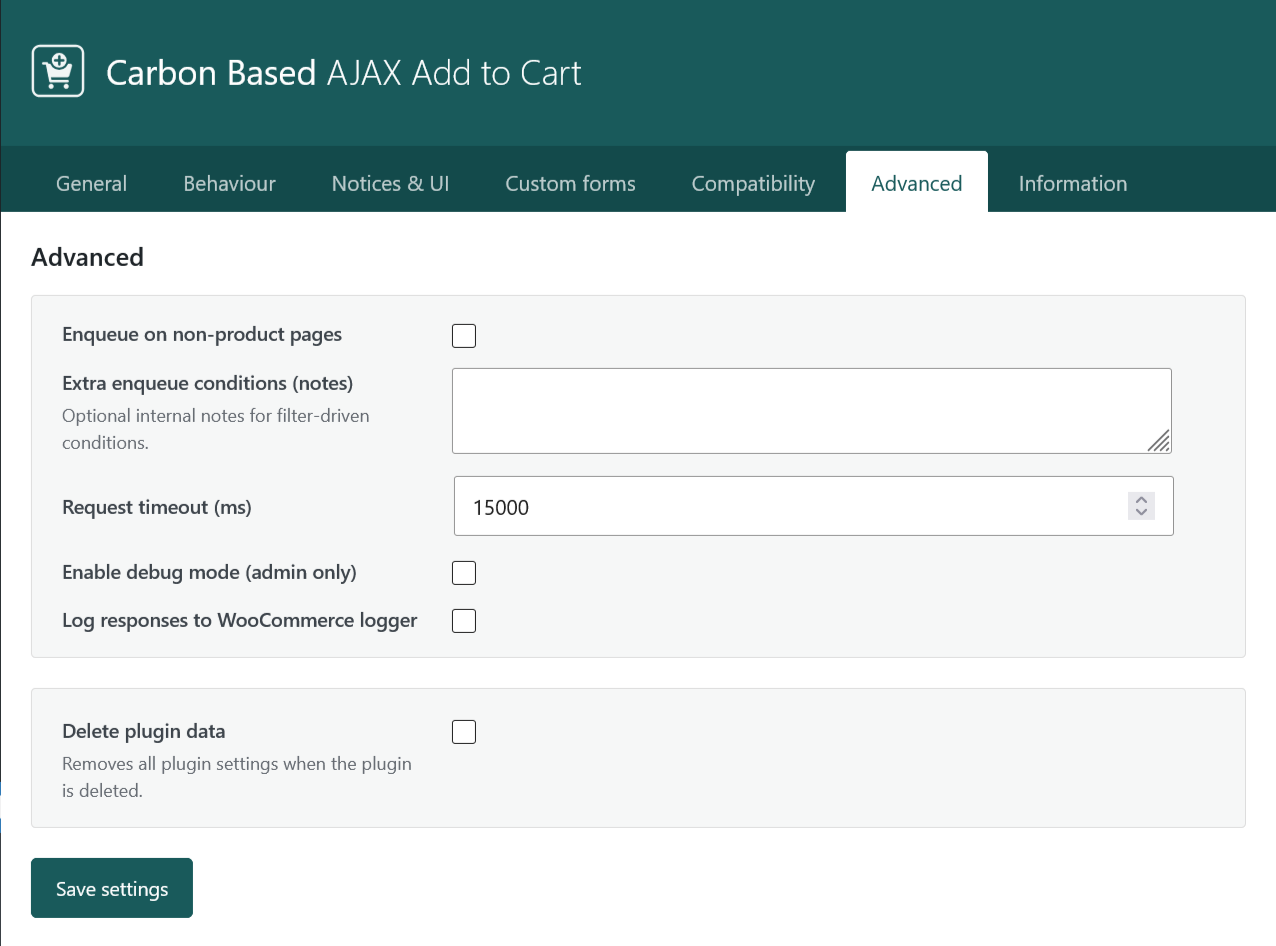
| Advanced | Script enqueue scope, request timeout, debug mode, WooCommerce logger, delete plugin data on uninstall. |
| Information | In-plugin reference for form contracts, compatibility, third-party fields, deactivate vs uninstall. |
Storefront workflow
- Enable Enable AJAX Add to Cart on the General tab.
- Leave Standard WooCommerce forms enabled when the product page uses
form.cartorform.variations_form. - On a single product page, select variations (if any) and click Add to cart. The page should not reload; WooCommerce notices should appear in the configured wrapper.
- In DevTools > Network, confirm a request to
wc-ajax=cbajax_add_to_cartreturns JSON withnotices_html. - Adjust Behavior and Notices & UI if notices appear in the wrong place or scroll behaviour needs tuning.
Standard WooCommerce forms vs Custom forms
Standard WooCommerce forms binds to form.cart and form.variations_form on single product pages. Use this for typical WooCommerce product templates.
Custom forms are for purchase boxes that use different selectors, hidden field names, or multiple forms on one page. Add a profile under Custom forms with:
- Form CSS selector (e.g.
form.cbs-variation-form) - Selectors for variation ID, parent product ID, quantity, and
attribute_*fields - Product types (simple / variable) for that profile
Custom forms mode: Merge with standard profile keeps both bindings active; Custom forms only disables the standard profile on pages where you rely solely on custom profiles.
Compatibility & third-party fields
Compatibility mode
- Normal (default) - prevents full page reload and stops other JavaScript handlers on the same add-to-cart form submit (reduces double-adds when multiple plugins bind to the form).
- Conservative - only prevents the reload; other plugins may still run submit handlers. Use when a theme or extension must hook form submit.
Force single-submit guard blocks repeat clicks while a request is in progress. With Compatibility mode set to Normal, it also participates in stopping other submit handlers. Deactivate if another plugin must run on the same form submit.
Extra form fields - comma-separated input names or selectors for third-party add-on fields. Inspect the product form in DevTools > Elements and use each input’s name attribute.
Form pass-through (compatible mode) forwards all named fields from the matched form when Extra form fields is not enough, for example heavy product add-ons. Enable only if needed.
Conflict detection - when enabled, the plugin can auto-disable binding when known conflicting AJAX add-to-cart plugins are present. Use the conflict allowlist to permit specific plugin slugs to coexist.
Notices & UI
- Notices target selector - default
.woocommerce-notices-wrapper. AJAX responses inject HTML here. - Fallback notice insertion - where to prepend notices when the target wrapper is missing after AJAX.
- Replace existing notices wrapper - swap the matched wrapper with fresh notice HTML from the response.
- Scroll to notices after response - uses WooCommerce scroll behaviour (100px offset).
- Loading indicator - theme
.loadingclass (default), plugin spinner, text only, or custom class / SVG URL.
Advanced & uninstall
- Debug mode (admin only) - extra detail in AJAX JSON; use to confirm
extra_fieldswere sent. - Log to WooCommerce logger - writes responses to WooCommerce > Status > Logs.
- Delete plugin data - opt-in on uninstall. Off by default. Deactivating does not remove settings. Cart and products are not affected.
Troubleshooting
- No AJAX on product page - confirm Enable AJAX Add to Cart is on and a profile matches your form (Standard or Custom).
- Full page reload still happens - another plugin or theme script may be handling submit; try Conservative compatibility mode or disable the conflicting plugin.
- Double add to cart - disable duplicate AJAX ATC plugins; use Normal compatibility mode and Force single-submit guard.
- Notices missing or in wrong place - check Notices target selector and fallback insertion; enable Replace existing notices wrapper if stale markup persists.
- Add-on fields ignored - add input names under Extra form fields; enable Form pass-through if still incomplete.
- Variable product errors - ensure variation ID and
attribute_{slug}fields are present in the form (see Information tab minimum form contract). - Network check - DevTools > Network:
wc-ajax=cbajax_add_to_cartshould returnnotices_html. - Developers - opt out per form with the
cbajax_atc_should_handle_formfilter; extend profiles withcbajax_atc_profiles.
Support
Include WordPress version, PHP version, WooCommerce version, plugin version (settings header), and whether the issue is on a standard or custom form when contacting support. For add-on conflicts, note active plugins on the product page and attach a redacted DevTools > Network entry for cbajax_add_to_cart.